Customgui
Custom GUIs with in-game action management for PocketMine-MP 5.x
CustomGUI Plugin
A powerful and flexible custom GUI system for PocketMine-MP 5.x that allows server administrators to create interactive graphical user interfaces with various actions and customizations.
🌟 Features
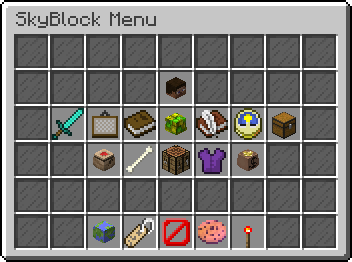
🎨 Visual GUI Builder
- In-game GUI Editor: Create and edit GUIs directly in-game with a visual grid interface
- Drag & Drop Interface: Intuitive 6x9 grid layout for easy item placement
- Real-time Preview: See your GUI changes instantly as you build
⚡ Action System
- Command Actions: Execute server commands when players click items
- Teleport Actions: Teleport players to specific coordinates
- GUI Navigation: Open other GUIs from within a GUI (nested navigation)
- Multiple Actions: Assign multiple actions to a single item slot
📝 Custom Lore System
- Dynamic Lore: Add custom titles and descriptions to any item
- Interactive Hints: Show additional information on item hover
- Rich Text Support: Use color codes and formatting in lore text
🔧 Management Features
- GUI Management Menu: Comprehensive in-game GUI management system
- Action Management: Add, edit, and remove actions from any slot
- Lore Management: Manage custom lore for items
- GUI Deletion: Safely remove unwanted GUIs
🚀 Performance & Reliability
- Caching System: Server-wide and per-player GUI caching for optimal performance
- Database Support: SQLite and MySQL database support for data persistence
- Error Handling: Robust error handling with user-friendly messages
- Permission System: Granular permission control for different user roles
📋 Requirements
- PocketMine-MP: Version 5.0.0 or higher
- PHP: Version 8.0 or higher
- Database: SQLite (included) or MySQL (optional)
🛠️ Installation
1. Download the Plugin
- Download the latest release from the releases page
- Extract the plugin files to your server's
pluginsfolder
2. Install Dependencies
The plugin includes all necessary libraries:
- InvMenu: For inventory menu functionality
- libasynql: For database operations
- pmforms: For form handling
3. Configure the Plugin
- Start your server once to generate the configuration files
- Edit
plugins/Customgui/config.ymlto configure your database settings - Restart your server
4. Set Up Permissions
Configure permissions in your permission plugin:
permissions:
  cg.use:
    description: "Allows use of /customgui command"
    default: true
  cg.admin:
    description: "Allows access to the GUI management menu"
    default: op
🎮 Usage
Commands
| Command | Permission | Description |
|---|---|---|
/customgui | cg.use | Opens the main GUI management menu |
/customgui <gui_name> | cg.use | Opens a specific GUI by name |
Creating Your First GUI
-
Access the Management Menu
/customgui -
Create a New GUI
- Select "Create GUI" from the main menu
- Enter a name for your GUI (e.g., "welcome_menu")
- Click "Submit"
-
Design Your GUI
- Use the 6x9 grid to place items
- Right-click to place items in slots
- Items will be saved automatically
-
Add Actions
- Click on an item slot to add actions
- Choose from Command, Teleport, or Open GUI actions
- Configure the action parameters
-
Add Custom Lore
- Add descriptive titles and descriptions to items
- Use color codes for formatting (e.g.,
§afor green)
Action Types
Command Actions
Execute server commands when players click items.
type: command
command: "spawn"
Teleport Actions
Teleport players to specific coordinates.
type: teleport
x: 100.5
y: 64
z: 200.5
Open GUI Actions
Open another GUI when players click items.
type: open_gui
gui_name: "shop_menu"
⚙️ Configuration
Database Configuration
The plugin supports both SQLite and MySQL databases:
SQLite (Default)
database:
  type: sqlite
  sqlite:
    file: customgui.sqlite
  worker-limit: 1
MySQL
database:
  type: mysql
  mysql:
    host: 127.0.0.1
    username: your_username
    password: your_password
    schema: your_database
  worker-limit: 2
GUI Storage
GUIs are stored as JSON files in the plugin_data/customgui/guis/ directory. Each GUI has its own file with the structure:
{
  "0,0": {
    "nbt": "item_nbt_data",
    "action": {
      "type": "command",
      "command": "spawn"
    },
    "lore": {
      "title": "Spawn",
      "description": "Return to spawn"
    }
  }
}
🔄 Migration from Old Versions
If you're upgrading from an older version of the plugin, your GUI data will be automatically migrated from the old resources/guis/ directory to the new plugin_data/customgui/guis/ directory.
Manual Migration
If automatic migration doesn't work, you can manually migrate your data:
- Manual File Copy
- Copy all
.jsonfiles fromplugins/Customgui/resources/guis/ - Paste them into
plugin_data/customgui/guis/ - Restart your server
- Copy all
Why This Change?
This change was necessary because:
- PHAR Compatibility: When the plugin is compiled into a .phar file, the
resources/directory becomes read-only - Better Organization: Plugin data is now properly stored in the plugin's data folder
- Server Standards: Follows PocketMine-MP best practices for data storage
🎯 Examples
Welcome Menu GUI
Create a welcome menu with navigation options:
-
Spawn Button
- Item: Compass
- Action: Teleport to spawn coordinates
- Lore: "§a§lSPAWN§r\n§7Click to return to spawn"
-
Shop Button
- Item: Emerald
- Action: Open GUI "shop_menu"
- Lore: "§a§lSHOP§r\n§7Click to open the shop"
-
Rules Button
- Item: Book
- Action: Command "rules"
- Lore: "§e§lRULES§r\n§7Click to view server rules"
Admin Panel GUI
Create an admin panel with management tools:
-
Player Management
- Item: Player Head
- Action: Open GUI "player_management"
- Lore: "§c§lPLAYER MANAGEMENT§r\n§7Manage players and permissions"
-
Server Control
- Item: Redstone
- Action: Command "server status"
- Lore: "§c§lSERVER CONTROL§r\n§7View server status and controls"
🔧 Advanced Features
Nested GUI Navigation
Create complex menu systems with multiple levels:
- Main Menu → Category Menu → Item Menu
- Each level can have its own actions and navigation
Multiple Actions per Slot
Assign multiple actions to a single item:
{
  "action": [
    {
      "type": "command",
      "command": "spawn"
    },
    {
      "type": "teleport",
      "x": 100,
      "y": 64,
      "z": 200
    }
  ]
}
Dynamic Content
- GUIs automatically reload when files are modified
- Cache system ensures optimal performance
- Real-time updates without server restarts
🐛 Troubleshooting
Common Issues
"Received invalid form json" error
- This usually occurs with GUI names that are numbers
- Ensure all GUI names are properly formatted as strings
- The plugin automatically handles this in recent versions
GUI not found error
- Check that the GUI file exists in
resources/guis/ - Ensure the GUI name matches exactly (case-sensitive)
- Verify file permissions
Actions not working
- Check that the action type is correct
- Verify command permissions for command actions
- Ensure coordinates are valid for teleport actions
Performance issues
- Consider using MySQL for large servers
- Increase worker-limit for MySQL connections
- Monitor cache usage
Debug Mode
Enable debug messages by checking the server console for detailed error information.
🤝 Contributing
We welcome contributions! Please feel free to:
- Fork the repository
- Create a feature branch
- Make your changes
- Submit a pull request
Development Setup
- Clone the repository
- Install dependencies
- Set up a development environment
- Follow the coding standards
📄 License
This project is licensed under the MIT License - see the LICENSE file for details.
🙏 Acknowledgments
- PocketMine-MP Team for the amazing server software
- InvMenu Library for inventory menu functionality
- libasynql for database abstraction
- pmforms for form handling
📞 Support
- GitHub Issues: Report bugs and request features
- Discord: Join our community for support
- Documentation: Check the wiki for detailed guides
Made with ❤️ by NetherByte
CustomGUI - Empowering server administrators with powerful GUI tools
Details
Version: 1.0.0
Downloads: 196
Updated: 7/13/2025
Supported API versions: 5.0.0 to 5.36.0
Categories: General, Developer Tools, Admin Tools
License: MIT
 NetherByte233